 VEATicaret
Çok Yakında! İşinizi internete taşıyalım!
PHP Scriptler
VEATicaret
Çok Yakında! İşinizi internete taşıyalım!
PHP Scriptler
 HazırYazılımlar
Mobil Uyumlu Hazır Scriptler
Profesyonel Web Tasarım
HazırYazılımlar
Mobil Uyumlu Hazır Scriptler
Profesyonel Web Tasarım
 WebTasarım
Kısa Sürede Uygun Fiyata Web Siteniz Olsun
Logo & Grafik Tasarımı
WebTasarım
Kısa Sürede Uygun Fiyata Web Siteniz Olsun
Logo & Grafik Tasarımı
 LogoTasarım
Size Özel Vektörel Logo Tasarım Hizmetimiz
LogoTasarım
Size Özel Vektörel Logo Tasarım Hizmetimiz
You can use CloudLinux Selector to enable or disable the allow_url_fopen directive in cPanel.
1. Log in to your cPanel account.
2. In the Software section, click on Select PHP Version.

3. Click on the Options menu.

Note: If the Options page shows an error related to the native PHP version, change it to a non-native version first.
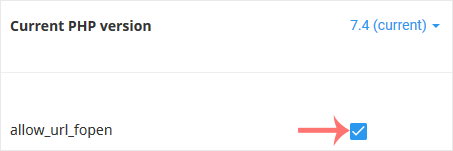
4. For enabling allow_url_fopen, checkmark it. For disabling it, uncheck it.




 Turkey (Türkçe)
 Worldwide (English)