 VEATicaret
Çok Yakında! İşinizi internete taşıyalım!
PHP Scriptler
VEATicaret
Çok Yakında! İşinizi internete taşıyalım!
PHP Scriptler
 HazırYazılımlar
Mobil Uyumlu Hazır Scriptler
Profesyonel Web Tasarım
HazırYazılımlar
Mobil Uyumlu Hazır Scriptler
Profesyonel Web Tasarım
 WebTasarım
Kısa Sürede Uygun Fiyata Web Siteniz Olsun
Logo & Grafik Tasarımı
WebTasarım
Kısa Sürede Uygun Fiyata Web Siteniz Olsun
Logo & Grafik Tasarımı
 LogoTasarım
Size Özel Vektörel Logo Tasarım Hizmetimiz
LogoTasarım
Size Özel Vektörel Logo Tasarım Hizmetimiz
If your FTP Account is not in use or you want to suspend it, you can do this in DirectAdmin.
1. Log in to your DirectAdmin Account.
2. In the Account Manager section, click on FTP Management or type FTP Management in the navigation filter box. The option will appear. Click on it.
3. Under the list of FTP Accounts, choose the account you want to suspend.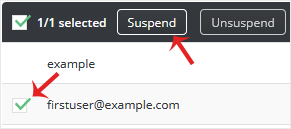
4. Click on Suspend.
Your FTP Account will be suspended. Later, you can start it again by clicking on Unsuspend.




 Turkey (Türkçe)
 Worldwide (English)