 VEATicaret
Çok Yakında! İşinizi internete taşıyalım!
PHP Scriptler
VEATicaret
Çok Yakında! İşinizi internete taşıyalım!
PHP Scriptler
 HazırYazılımlar
Mobil Uyumlu Hazır Scriptler
Profesyonel Web Tasarım
HazırYazılımlar
Mobil Uyumlu Hazır Scriptler
Profesyonel Web Tasarım
 WebTasarım
Kısa Sürede Uygun Fiyata Web Siteniz Olsun
Logo & Grafik Tasarımı
WebTasarım
Kısa Sürede Uygun Fiyata Web Siteniz Olsun
Logo & Grafik Tasarımı
 LogoTasarım
Size Özel Vektörel Logo Tasarım Hizmetimiz
LogoTasarım
Size Özel Vektörel Logo Tasarım Hizmetimiz
You can change the root user account password from WHM.
1. Log in to your WHM Root Account.
2. Go to Server Configuration >> Change Root Password or type Change Root in the menu filter box. The option will appear. Click on it.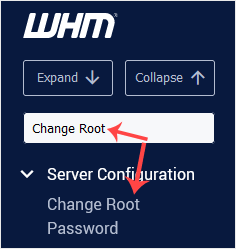
3. Enter your new password or use the password generator option to generate a new random password. Make sure that you save your new password and keep it in a safe place.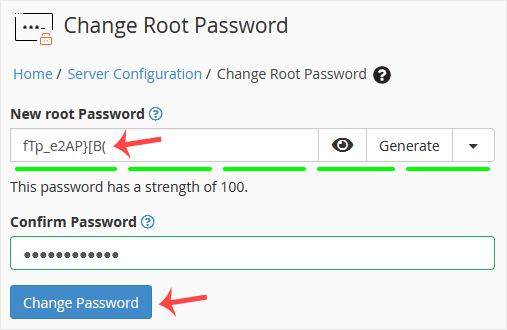
4. Click on Change Password.
Your password will be changed, and you can log in to your WHM root account with your new one.




 Turkey (Türkçe)
 Worldwide (English)