After you access your SiteWorx account, follow these steps to reset your password:
1. Log in to your SiteWorx account.
2. In the Administration section, click on User Accounts.
3. Click on the Pencil icon attached to the account you want to edit.
4. Enter the new password or click on Magic Wand to generate one.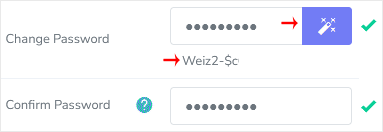
5. Click on Save.
Now, you can log in to SiteWorx with your newly-created password.
Note: If you forgot your SiteWorx password and cannot access your account, please open a ticket with us.
Bilgi bankasını detaylı olarak incelediniz, fakat ihtiyacınız olan bilgiyi bulamıyorsanız,
Bir Destek Talebi Oluşturun.



 Türkiye (Türkçe)
 Worldwide (English)