

 Türkiye (Türkçe)
 Worldwide (English)






📢 Önemli Bilgilendirme
Değerli ziyaretçilerimiz, 09.01.2026 Tarihi itibari ile alan adı,hosting ve sunucu satışlarımız aktif olacaktır. Bizleri tercih ettiğiniz için teşekkür ederiz.
İncele
You can find our nameservers in your hosting welcome email. You need to update your domain nameservers to our nameservers.
If your domain is registered at GoDaddy, you should follow this tutorial to update your domain's Nameservers.
1. Visit Godaddy.com and click on Sign In. Under "Registered Users", click again on Sign-in. You will be redirected to the login form.
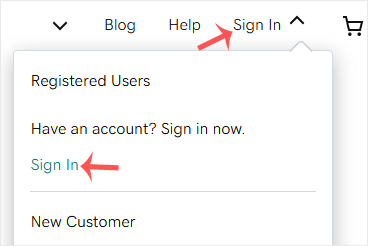
2. Enter the Username or Customer ID and the password of your GoDaddy account. Then click on Sign In.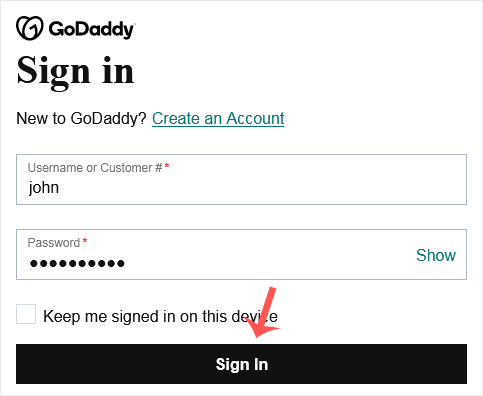
3. After a successful login, under the Domains section. Click on DNS next to the domain you wish to manage.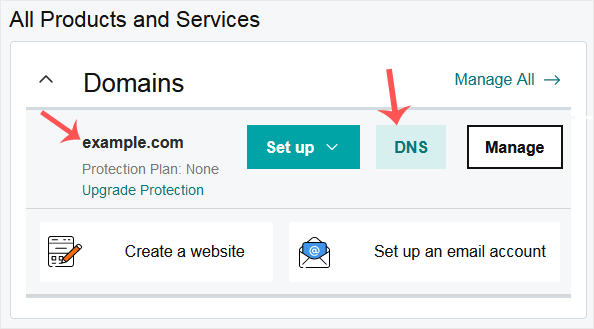
4. Scroll down to the Nameservers and click on Change.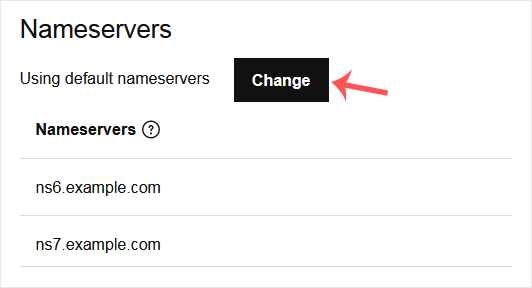
5. Scroll down to the end of the page and click on Enter my own nameservers (advanced).
6. Enter your nameservers in the text fields and click on Save.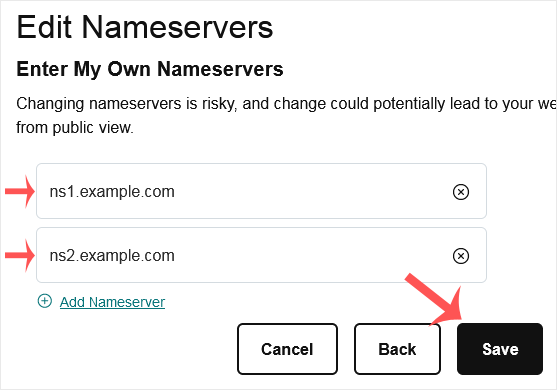
Note: It may take anywhere from 12 to 24 hours for the changes to take effect worldwide.
Bilgi bankasını detaylı olarak incelediniz, fakat ihtiyacınız olan bilgiyi bulamıyorsanız,
Bir Destek Talebi Oluşturun.