You can remove your database from the DirectAdmin control panel. However, we recommend that you create a backup of it before removing it.
1. Log in to your DirectAdmin Account.
2. In the Account Manager section, click on MySQL Management or type MySQL Management in the navigation filter box. The option appears. Click on it.
3. From the list of databases, select the database of your choice. You can choose multiple databases.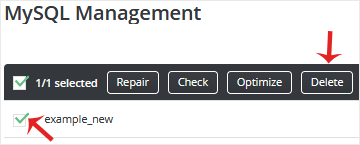
4. Click on Delete. Please do it again to confirm the removal of the database.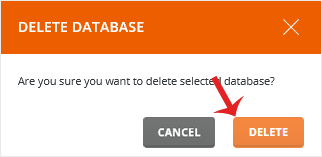
The selected database should have been deleted.
Bilgi bankasını detaylı olarak incelediniz, fakat ihtiyacınız olan bilgiyi bulamıyorsanız,
Bir Destek Talebi Oluşturun.



 Türkiye (Türkçe)
 Worldwide (English)